

Behind the lessons
Every video is made from the real product.
- Recorded in a demo shop
- Voice in ગુજરાતી, हिन्दी and English
- Checked by a person
A lesson is written once, as steps. A script then clicks through VASAH's real screens in a demo shop with sample stock, a voice reads the steps in your language, and the captions are the same words. Nothing is filmed in a real shop.
Storyboard
Make your first bill, frame by frame
Each frame is one moment of the video: what the screen shows, and what the voice says in each language.
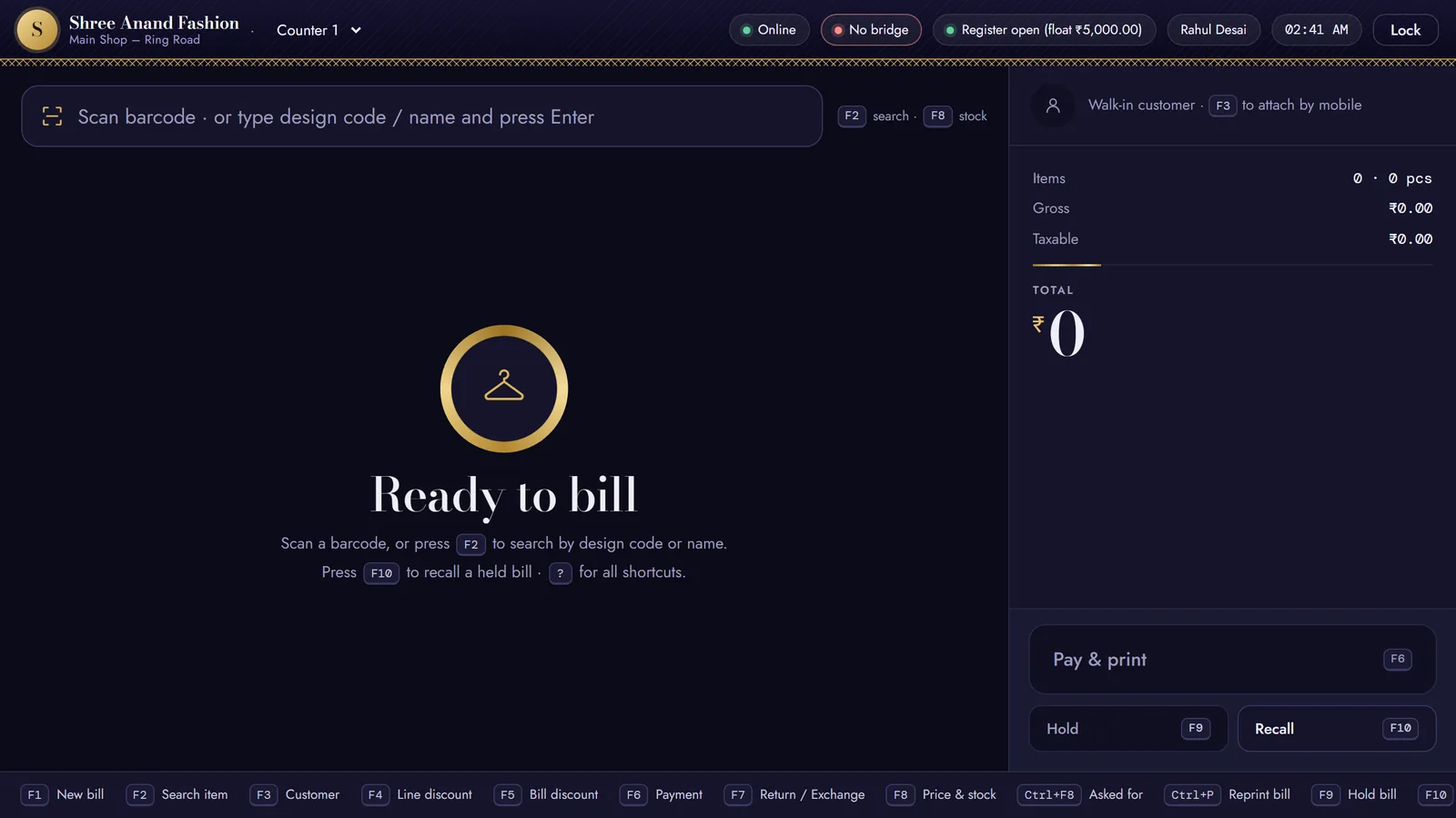
0:00Title card
On screen
The counter, ready to bill, with the lesson's title on it.
Voice · ગુજરાતી
ટેગ સ્કેન કરો, પૈસા લો અને પ્રિન્ટ કરો — F1, F6, F11.
Voice · हिंदी
टैग स्कैन करें, पैसे लें और प्रिंट करें — F1, F6, F11।
Voice · English
Scan the tag, take the money and print — F1, F6, F11.
0:07Frame 2
On screen
F1 is pressed — its key shows on the screen — and the pointer shows “Ready to bill”.
Voice · ગુજરાતી
નવા બિલ માટે F1 દબાવો. સ્ક્રીન પર “બિલ માટે તૈયાર” દેખાશે.
Voice · हिंदी
नए बिल के लिए F1 दबाएँ। स्क्रीन पर “बिल के लिए तैयार” दिखेगा।
Voice · English
Press F1 for a new bill. The screen says Ready to bill.
0:13Frame 3
On screen
The picture moves in on the scan box; the tag is scanned twice and two pieces join the bill.
Voice · ગુજરાતી
ટેગ પરનો બારકોડ સ્કેન કરો. વસ્તુ ભાવ સાથે બિલમાં આવી જશે. એક વધુ જોઈએ તો ફરી સ્કેન કરો.
Voice · हिंदी
टैग का बारकोड स्कैन करें। सामान दाम के साथ बिल में आ जाएगा। एक और चाहिए तो फिर से स्कैन करें।
Voice · English
Scan the barcode on the tag. The piece joins the bill with its price. Scan it again for one more.
0:24Frame 4
On screen
The pointer goes to Pay & print and F6 is pressed: the payment window opens.
Voice · ગુજરાતી
F6 દબાવો. ચુકવણી ખૂલશે — પૂરી રકમ રોકડમાં ભરેલી હશે.
Voice · हिंदी
F6 दबाएँ। भुगतान खुलेगा — पूरी रकम नक़द में भरी होगी।
Voice · English
Press F6. Payment opens with cash for the full total.
0:31Frame 5
On screen
Cash given is typed, and the picture moves in on the change to return.
Voice · ગુજરાતી
“આપેલી રોકડ” પર ક્લિક કરી ગ્રાહકે આપેલી નોટ લખો. “પાછા આપવાના” મોટા આંકડામાં દેખાશે.
Voice · हिंदी
“दी गई नक़द” पर क्लिक करके ग्राहक का दिया नोट लिखें। “लौटाने हैं” बड़े अंकों में दिखेगा।
Voice · English
Click Cash given and type the note the customer gave. Change to return shows in big numbers.
0:40Frame 6
On screen
F11 is pressed and the bill prints.
Voice · ગુજરાતી
સેવ અને પ્રિન્ટ માટે F11 દબાવો. બિલ અને છુટ્ટા આપો.
Voice · हिंदी
सेव और प्रिंट के लिए F11 दबाएँ। बिल और छुट्टे दें।
Voice · English
Press F11 to save and print. Hand over the bill and the change.
How it's made
From the written steps to the screen.
- 1
The lesson script
One task, every click, and the words to say — the lesson's own steps, in ગુજરાતી, हिन्दी and English.
- 2
Recorded in a demo shop
A script clicks through the real VASAH screens by itself, in a demo shop with sample stock. No real shop's data is ever on screen.
- 3
A voice in three languages
A computer voice reads the steps in Gujarati, Hindi or English, saying shop words — bill, stock, UPI — the way staff say them.
- 4
Captions and close-ups
Captions come from the same words. The picture moves in on the box in use, a gold ring shows where to look, and the key pressed appears on screen.
- 5
Two sizes, our own player
720p, and 480p for Data saver, with a poster and captions — played in VASAH's own ad-free player, here and in the ? help inside VASAH.
Screen changed? Record it again.
Because every lesson is a script, a changed screen is recorded again from the same script — nobody films it by hand, and the video shows today's screen.
The person's check
Before a video goes out, someone checks five things.
Every step, in order
The title, then each written step; the pointer and the gold ring on what the voice names.
The right keys
A key on screen for every key the voice says, and the printed bill for every print.
Nothing half-loaded
No “Loading…” or empty list where the voice describes a result.
Captions match the voice
Word for word — with the counter's own Gujarati and Hindi words.
Light enough for a phone
The 480p video stays under 16 MB.